
Inspo - Recipes & Meal Planner
Pinecone Labs LLCFood & Drink
4.6129.00 Reviews
- Version
- 5.9
- Installs
- 50.00K
- Age Rating
- Everyone
Screenshots
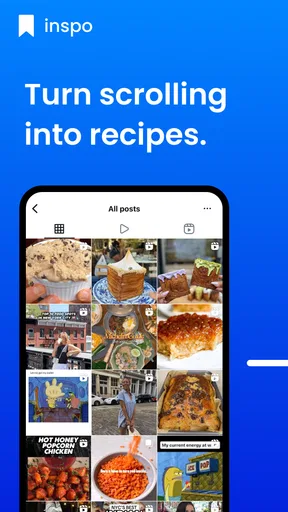
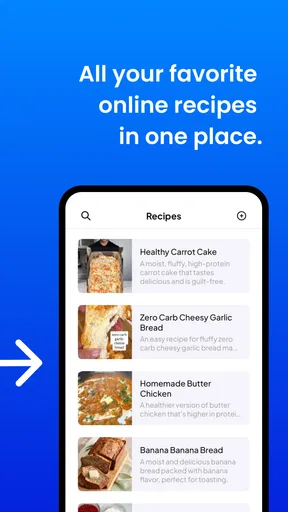


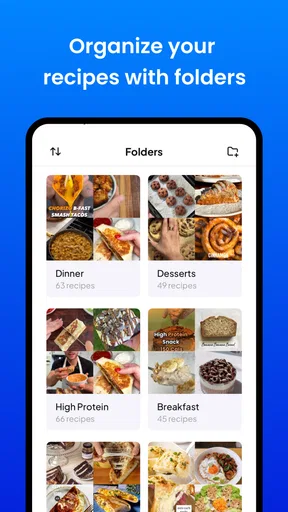
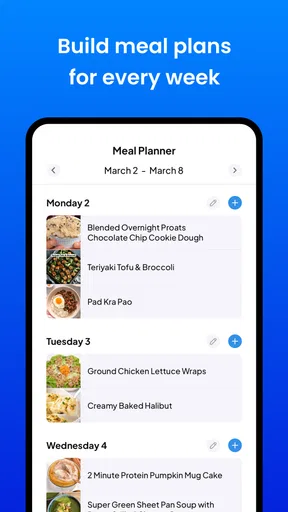
Our Review of Inspo - Recipes & Meal Planner
 Analysis by Appyee
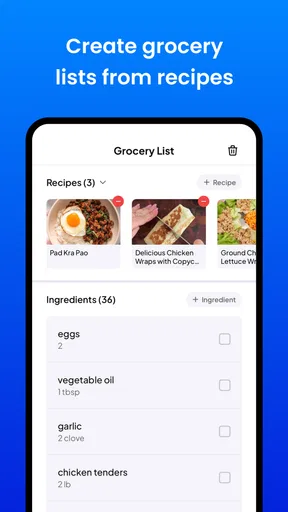
Planning meals sounds simple until recipes are scattered across screenshots, bookmarks, notebooks, and messages. I tried Inspo - Recipes & Meal Planner as a food and drink app with one practical question in mind: can it make the small decisions around cooking feel less tiring? Its focus is clear—bringing recipes, meal plans, and grocery lists into one place—but the real value depends on how consistently you use that workflow.
My first impression was that Inspo is aimed at people who want structure without turning meal planning into a serious project. I could think about a week of dinners, collect ideas, and turn those choices into a shopping routine instead of starting from an empty list every time. That makes it more useful than a simple recipe bookmark folder, although it is not automatically a full replacement for every cooking, nutrition, or grocery app.
The app is developed by Pinecone Labs LLC and is available free of charge. It is rated for Everyone, so its basic audience is broad: students, families, busy professionals, occasional cooks, and anyone who wants a more organized way to decide what to eat. With an average rating of 4.6 from around two thousand ratings, it has attracted a noticeable amount of user interest, while over fifty thousand installs suggest that it is not an obscure experiment.
How Inspo fits into a real meal-planning routine
I find Inspo most useful when I treat planning as a short handoff from ideas to action, rather than another task to maintain all week. In the next section, I’ll look at how its recipe, schedule, and shopping-list workflow can fit around changing plans—and where a little manual checking still makes the difference.
From scattered ideas to a usable weekly plan
The strongest idea behind Inspo is not any single recipe. It is the connection between inspiration and action. Many recipe apps are good at showing attractive meals, but they leave the user to remember which dishes were chosen, when they will be cooked, and what needs to be purchased. Inspo is more practical because its purpose reaches beyond browsing.
I found the meal-planning stage most useful when I treated it as a short weekly reset rather than something I had to maintain constantly. A realistic routine would be to choose a few dependable meals, add one or two more interesting options, and then build the grocery list around that selection. This approach avoids a common mistake: planning seven ambitious dinners and abandoning the whole system after one busy evening.
A particularly useful habit is to plan around effort, not just taste. I would place a faster meal on a late workday, reserve a more involved recipe for a quieter evening, and leave room for leftovers. That sounds obvious, but putting the decisions in one visible planning flow makes the trade-off easier to notice. The app becomes more valuable when it helps you manage the week you actually have rather than the ideal week you wish you had.
Why the grocery-list connection matters
The grocery-list side is where this type of app can save more time than the recipe screen itself. A recipe idea is only helpful if I can turn it into ingredients before I reach the store. Keeping those steps together reduces the chance of choosing a meal and then forgetting a key item, or buying random ingredients without a plan for using them.
My practical tip is to review the list before shopping instead of trusting it blindly. Check the pantry, combine duplicate ingredients mentally, and remove anything already at home. This is especially important for staples that appear across several recipes. A planning tool can organize choices, but it cannot know what is already in your cupboard unless you actively maintain that information.
Another useful workflow is to build the list after deciding the order of meals. If the same ingredient can serve two dishes, that becomes easier to spot when the plan is visible as a group rather than as isolated recipes. This can reduce waste, but only if I choose recipes with some overlap. Planning completely unrelated meals may still produce a long, expensive shopping list even when the app has organized it neatly.
Using it for different household situations
For one person, Inspo can help prevent the familiar cycle of buying ingredients for an optimistic plan and then letting them go unused. I would use it to select meals that share a few ingredients while varying the final dish. That gives some variety without requiring a separate shopping trip for every recipe.
For a couple or family, the app is more useful as a conversation tool. One person can decide the meals while another checks the grocery needs, or the household can agree on a short plan before shopping. The benefit is not that the app makes everyone cooperate automatically; it is that the plan gives the conversation something concrete to work from.
It can also suit a beginner who feels overwhelmed by deciding what to cook. Instead of searching endlessly, that user can start with a small number of familiar meals and gradually build a repeatable routine. I would not recommend filling the plan with complicated dishes at the beginning. The best test is whether the app helps you cook more reliably, not whether it lets you create the most exciting menu.
A realistic week with the app
Imagine getting home on Sunday evening with no clear plan for the coming week. I would open Inspo, choose a few meals that match the available time, and place them across the week rather than treating every night equally. A quick option could cover the busiest day, a recipe with planned leftovers could handle another, and a flexible meal could remain available for the evening when plans change.
After that, I would review the grocery list against what is already in the kitchen. The important step is not simply generating the list; it is editing it so it reflects reality. On shopping day, the list becomes a checklist rather than a second memory test. Later, if one dinner is skipped, I would move the meal instead of abandoning the entire plan.
This scenario shows both the strength and the limit of Inspo. It can reduce friction between choosing meals and preparing to shop, but it still depends on a small amount of judgment. The app supports the routine; it does not replace the user’s decisions about portions, substitutions, leftovers, or changing schedules.
What the free access means for value
Inspo is free to download and use as an entry point, which makes it easy to test without committing money first. That matters for a planning app because its usefulness is personal. Some people enjoy organizing meals digitally, while others quickly return to a note on their phone or a paper list. Free access lets you discover which group you belong to through actual use.
There are in-app purchases listed at prices ranging from $11.99 to $39.99 per item. I would therefore separate the decision into two stages. First, judge whether the free experience fits your cooking routine. Only after that should you consider whether any paid option provides enough additional value for the way you plan meals.
I would not treat the existence of paid items as a reason to reject the app, but I also would not assume that paying automatically makes meal planning better. The sensible test is whether the free workflow already saves you effort. If it does, a paid purchase may be worth considering for someone who uses the app regularly; if it does not, spending more is unlikely to solve the underlying problem.
Where the app feels more useful than ordinary alternatives
The usual alternative is a notes app. Notes are flexible and fast, and they may be better for someone who wants complete control over formatting. However, a note often becomes a flat block of text: recipe names in one place, ingredients in another, and a separate reminder for the week. Inspo is more purpose-built because it connects the planning idea with the shopping task.
Another alternative is saving recipes in a browser or social media app. That works well for collecting inspiration, but saved content can become difficult to turn into a coherent menu. Inspo is better suited to the moment after discovery, when I need to decide what I will actually cook and what I need to buy.
A paper planner can still be preferable for people who enjoy writing by hand or do not want another screen in the kitchen. It is also easier to customize visually. The trade-off is that paper does not offer the same convenience when a meal changes or when I need to adjust a shopping list while moving through a store.
Dedicated nutrition tools may be a better choice for users whose main goal is calorie tracking, macro targets, allergy management, or detailed dietary analysis. Inspo’s appeal is organization around recipes and meals, not turning food planning into a measurement exercise. Choosing it for strict nutritional monitoring would be a mismatch.
Small habits that make the system work better
The first habit I recommend is planning fewer meals than you think you need. Leave space for leftovers, takeout, social plans, or a night when cooking simply does not happen. A plan that survives interruptions is more valuable than a perfect schedule that collapses after one change.
The second is to create a repeatable base. Keep a few dependable meals in regular rotation, then use new recipes as optional additions. This reduces decision fatigue and makes the grocery list easier to check. Inspo becomes a tool for controlled variety rather than a constant stream of new ideas.
The third is to review the list at home before shopping. This is the step most likely to protect the budget because it catches duplicate staples and ingredients that are already available. The app can gather what your chosen meals require, but the final list should still reflect your kitchen and your household’s actual appetite.
A fourth useful approach is to plan by ingredient families. If several meals can use the same vegetables, herbs, grains, or sauces, the week becomes easier to manage. This is not a special button I would rely on; it is a planning strategy that takes advantage of the app’s central organization. It also helps avoid buying a single-purpose ingredient for one recipe.
Limitations I noticed in the overall concept
The biggest limitation is that organization is not the same as automation. Inspo can help bring choices together, but I still need to make sensible decisions about serving sizes, substitutions, pantry stock, and timing. Anyone expecting the app to plan an entire household without supervision may find the process more manual than expected.
There is also a risk of overplanning. A beautifully arranged meal schedule can create pressure if every evening is treated as a commitment. I prefer using the plan as a flexible guide. Move meals when necessary, keep easy options available, and avoid judging the system by whether the week follows the original order.
Users with very specific dietary requirements should be cautious about relying on a general recipe-planning workflow alone. If every ingredient must meet a strict medical or ethical condition, each recipe and grocery item needs personal checking. In that situation, a specialized service may be a better primary tool, with Inspo used only if its organization still adds value.
The paid structure also deserves a deliberate approach. The free starting point is helpful, but purchases between $11.99 and $39.99 per item are meaningful amounts for an app in this category. I would use the free version long enough to see whether meal planning becomes a genuine habit, rather than buying immediately because the idea sounds useful.
Who is most likely to get real value
I think Inspo is a good match for someone who repeatedly asks, “What should I cook this week?” and then shops without a clear answer. It is also well suited to people who save many recipes but rarely turn them into meals. The bridge between inspiration, scheduling, and groceries is the reason to choose it.
Busy households may appreciate the shared logic of a visible plan, especially when different people handle cooking and shopping. So may beginners who want a gentle structure without starting with detailed nutrition tracking. The app’s Everyone rating also makes it approachable for a broad household audience, though the usefulness still depends on personal cooking habits.
I would skip it if I already have a notes-based system that I maintain effortlessly. I would also look elsewhere if my priority is advanced dietary analysis, highly specialized meal rules, or a fully automatic service that removes most decisions. Inspo is most convincing for people who want help organizing their own choices, not for people who want those choices made entirely for them.
My verdict on downloading and paying
My recommendation is to start with the free version and judge it by one ordinary week. Choose a manageable set of meals, inspect the grocery list, shop from the edited version, and see whether the plan makes the following days easier. That test is more revealing than browsing recipes for a few minutes.
If the workflow becomes part of your routine, the app can offer practical value beyond a collection of recipe links. It gives meal decisions a home, makes shopping more deliberate, and encourages a more realistic relationship with cooking. The real win is less mental clutter, not a more impressive menu.
If you rarely cook, dislike planning, or already manage meals comfortably with a simple note, the extra structure may not justify changing habits. And if you are considering an in-app purchase, I would make that decision only after the free experience has proved useful in your own kitchen. The listed paid items range from $11.99 to $39.99, so the purchase should support an established routine rather than fund a hopeful experiment.
Released on May 18, 2025, the app is currently at version 5.9 and supports Android 6.0 or later. Those details make it accessible to many Android users, while the free entry point lowers the risk of trying it. My final view is positive but measured: Inspo is worth downloading for cooks who need a practical connection between recipes, weekly planning, and groceries. It is not a universal food-management solution, but for that specific everyday problem, Inspo - Recipes & Meal Planner offers a clear and useful place to begin.
Verdict
Strengths of Inspo - Recipes & Meal Planner
- Personalized recipe ideas make planning meals more convenient.
- Meal planning helps organize cooking for the week ahead.
- Useful inspiration for trying new dishes and ingredients.
- Recipe collections can simplify grocery list preparation.
- Clean interface makes browsing food ideas easy and enjoyable.
Limitations of Inspo - Recipes & Meal Planner
- Some recipes or features may require a paid subscription.
- The app may not suit users with highly specific dietary needs.
- Grocery lists may need manual adjustments for pantry items.
- Recipe availability can vary depending on your region.
- Frequent notifications may feel unnecessary for occasional users.
Similar Picks in This Category
View All
Rappi: Food Delivery, Grocery
Rappi, Inc - Delivery3.5

McDonald’s: Cupons e Delivery
Arcos Dorados4.3

Swiggy: Food Instamart Dineout
Swiggy4.7

Blinkit: Groceries & more
Blinkit4.8

foodpanda: food & groceries
Foodpanda GmbH a subsidiary of Delivery Hero SE4.0

Zomato: Food Delivery & Dining
Zomato4.7
Frequently Asked Questions
What is Inspo - Recipes & Meal Planner?
Inspo - Recipes & Meal Planner is designed to help you discover cooking ideas, organize recipes, and plan meals more efficiently. It can be useful whether you are preparing quick weekday dishes, looking for healthier inspiration, or trying to create a more structured food routine. Before downloading, remember that the available recipes, planning tools, and personalization options may depend on the app version and your device.
Can I use Inspo to create a weekly meal plan?
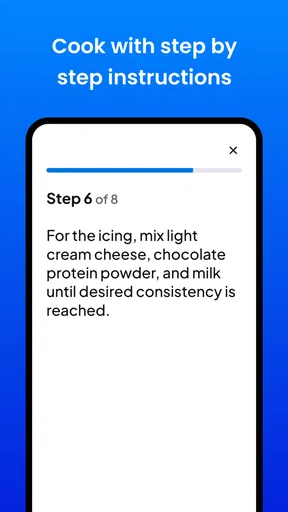
The app is intended to make meal organization easier by allowing users to browse recipe inspiration and arrange ideas into a more convenient plan. Depending on the current version, you may be able to save recipes, organize meals by day, and prepare a shopping list from selected dishes. It is worth exploring the planning interface first, especially if you need detailed nutrition tracking or highly customized schedules.
Does Inspo - Recipes & Meal Planner support dietary preferences and restrictions?
Inspo may help users find recipes that match particular eating styles, ingredients, or personal preferences, but the exact filtering options can vary. If you follow a strict vegetarian, vegan, gluten-free, low-carb, allergy-sensitive, or medically prescribed diet, always read every ingredient and preparation instruction carefully. The app should provide inspiration, not replace advice from a qualified healthcare or nutrition professional.
Is Inspo - Recipes & Meal Planner free to download?
The application may be available to install without an upfront charge, although some features, recipe collections, or convenience tools could require in-app purchases or a subscription. Check the store listing and the payment screen before starting a trial or confirming a purchase. Also review renewal terms, because subscriptions can continue automatically unless they are canceled through your Android or iOS account settings.
Can I use Inspo - Recipes & Meal Planner without an internet connection?
Some meal-planning apps require an internet connection to load recipe images, synchronize saved content, update collections, or access account-based features. Previously opened or saved recipes might remain available offline, but this is not guaranteed for every section of Inspo. If you plan to cook somewhere with unreliable connectivity, open the recipes and save the information you need before leaving home.
